Meeting intelligence is software that turns a live meeting into the context and actions a team actually needs, instead of just a transcript to read afterward. A note-taker tells you what was said. Meeting intelligence brings the work you are discussing, the document, the ticket, the decision from last month, into the room while the conversation is still happening.
That matters for any team whose meetings keep circling back to work that lives in another tool someone has to stop and open.
The meeting problem
Most teams lose hours every week to meetings, and stepping out of one to look something up is exactly the kind of interruption that research from the University of California, Irvine found takes around 23 minutes to fully recover from. The meeting itself is rarely the real problem. The problem is everything around it:
- Notes pile up that nobody reads again.
- Action items get agreed out loud, then lost between the call and the tool where the work actually lives.
- Someone asks "what is the status of that?" and the answer is in a tab nobody has open.
- A decision you made last month is buried in a transcript you would have to scroll through to find.
Transcription does not fix any of this. It just hands you a longer document to search later.
Note-taking vs. meeting intelligence
AI note-takers like Granola, Otter, and Fathom are genuinely good at what they do. They capture what was said and turn it into clean, shareable notes. If all you need is a record of the conversation, they work well.
Meeting intelligence is a different job. Instead of producing output after the meeting, it pulls context in during the meeting.
| Dimension | AI note-taker | Meeting intelligence |
|---|---|---|
| When it works | After the meeting | During the meeting |
| Direction | Meeting to notes (output) | Your tools to the meeting (input) |
| What you get | A record of what was said | The context and actions you need now |
| Best for | Keeping a transcript | Making decisions and capturing work as it happens |
The two are not mutually exclusive. Plenty of teams keep a note-taker for the record, and add the live context manually, stopping mid-meeting to open the ticket or doc themselves. That manual step is exactly what meeting intelligence removes.
How Intakall does it
Intakall is meeting intelligence for teams. It works inside the meeting itself, with no bot joining the call.
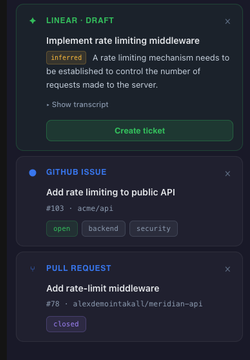
- Live context cards. As you talk, Intakall surfaces the relevant ticket, document, or past decision in a sidebar, so you do not have to leave the meeting to look it up.
- Capture work by voice. Turn a spoken action item into a real task without switching tabs or breaking the flow of the conversation.
- Connected to where your work lives. Intakall pulls context from the tools your team already uses, and the list of integrations is growing.
- A summary when it ends. You still get a clean post-meeting summary, so nothing depends on one person taking perfect notes.
One person records, and the whole team sees the same live context, so no one is stuck taking notes.
Meeting intelligence for engineering teams
Engineering is where this gap shows up most, because the thing you are discussing almost always lives in a tool you have to leave the call to open. Engineers spend around 10.9 hours a week in meetings, based on Clockwise's benchmark of 80,000 developers, so the cost of those context switches adds up fast.
For engineering teams, Intakall connects to GitHub and Linear today:
- The pull request, issue, or past decision you are talking about surfaces in the sidebar as it comes up, so standups and reviews do not stall on "let me find it."
- You can create a Linear ticket out loud during the meeting, and it is there when the call ends.
- The context comes from your real codebase and tracker, not a generic summary.
GitHub and Linear are the live integrations today, with more platforms on the way. This page only describes what ships now.
FAQ
What is meeting intelligence software?
Meeting intelligence software turns a live meeting into the context and actions a team needs, rather than only a transcript afterward. It connects to the tools where your work lives and surfaces relevant information during the conversation.
How is meeting intelligence different from an AI note-taker?
An AI note-taker records what was said and produces notes after the meeting. Meeting intelligence works during the meeting, pulling in context like documents and tickets and letting you capture action items as they come up.
Who is meeting intelligence for?
Any team whose meetings keep referring to work that lives in another tool. It is especially useful for engineering teams, where the ticket, pull request, or decision being discussed is almost always one tab away.
Does Intakall put a bot in my meeting?
No. Intakall works inside the meeting without adding a bot to the call, so there is no extra participant in the room.
What does Intakall integrate with?
Intakall connects to GitHub and Linear today, surfacing context from your codebase and tracker and letting you create Linear tickets by voice during the meeting. More integrations are on the way.
Where does Intakall work?
Intakall works right inside your meeting, with no bot joining the call. It runs in your browser today, and we are adding more of the places teams meet.
Get started free and see live context in your next meeting.